Lifetime - Access
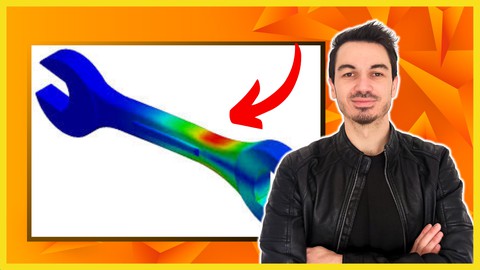

SOLIDWORKS: Introduction To Finite Element Analysis (FEA)
Master SOLIDWORKS FEA static simulation. Learn stress analysis, meshing, fixtures & CSWSA-FEA prep with step-by-step training.

Created By Alen Oletic


What You'll Learn
- Set up a simulation: Prepare models, define fixtures & loads, create meshes, and analyze results.
- Perform stress & strain analysis: Learn to calculate deformations at specific points.
- Run multiple simulations: Learn advanced meshing techniques for better accuracy.
- Optimize time & memory: Use planar & circular symmetry tools for efficient simulations.
- Analyze different structures: Perform static analysis on solid bodies, shell bodies, trusses & beams.
- Prepare for CSWSA-FEA Exam: Learn real-world problem-solving techniques & time management.
- Gain confidence to pursue high-paying roles in CAD design & analysis.
- Master SOLIDWORKS FEA tools & list them confidently on your resume.
Requirements
- Basic knowledge of SOLIDWORKS.
- A PC with SOLIDWORKS 2016 or newer installed.
- Basic understanding of Windows OS.
Course Description
Finite Element Analysis (FEA) is an essential tool for engineers to evaluate how forces affect structures and components. This course provides a structured, step-by-step approach to mastering SOLIDWORKS FEA tools, from setting up simulations to interpreting results.
Common struggles among students include:
- Not knowing the correct approach for setting up simulations.
- Struggling to prepare models for static analysis.
- Lack of exposure to exam-style FEA problems.
In this hands-on course, you will learn everything required to pass the CSWSA-FEA exam while also gaining practical skills for real-world applications.
Course Breakdown:
1. Simulation Setup & Basics
- Model preparation & defining loads.
- Applying fixtures & boundary conditions.
- Creating & refining simulation meshes.
2. Running Static Simulations
- Performing stress, strain, and displacement analysis.
- Defining custom meshes & running multiple tests.
- Generating detailed reports & interpreting results.
3. Advanced FEA Techniques
- Planar & circular symmetry tools to optimize memory & speed.
- Performing shell body & frame body analysis.
- Analyzing trusses vs. beams – understanding key differences.
4. CSWSA-FEA Exam Preparation
- Exam-style questions with solutions.
- Time management strategies for test-taking.
- Secret tips & tricks to maximize your score.
Who Should Take This Course?
- Beginner & intermediate SOLIDWORKS users looking to enhance FEA skills.
- Engineering students & professionals who need FEA for real-world applications.
- Individuals preparing for the CSWSA-FEA exam to boost career prospects.
Why Enroll?
This course simplifies complex FEA concepts, making them easy to understand and apply. Whether you're aiming for certification or improving your engineering skills, this training is designed to help you succeed.
Enroll now and take your SOLIDWORKS FEA skills to the next level!
Course content

 1. About the Course
2. Overview
3. FEA concept
4. Simulation Add In
1. Introduction
2. Simulation Add In and Options
3. Geometry preparation
4. New study
5. Material
6. Fixture
7. Loads
8. Mesh and Model simplification
9. Standard mesh
10. Curvature based mesh
11. Mesh control
12. Running Analysis
13. Geometry modification
14. Chart Plots
15. Results systematisation
16. Compare results
17. Separate studies
18. Loadcase Manager
19. Conclusion
1. Introduction
2. Geometry preparation
3. Loads and fixture
4. Mesh
5. Run and Comparison Analysis
1. Introduction
2. Static analysis
3. Full model analysis and Comparison
4. Load mesh Run
FE Types
1. Introduction
2. Surface - Geometry preparation
3. Surface - Shell Static Study
4. Surface - Conclusion
5. Sheet Metal - Introduction
6. Sheet Metal - Geometry preparation
7. Sheet Metal Analysis and Results comparison
1. Introduction
2. Weldment setup
3. Weldments- Analysis
4. Weldments - Results
5. Extrude analysis
6. Extrude results
1. Introduction
2. Beam vs Truss
3. Analysis setup
4. Results
1. About the Course
2. Overview
3. FEA concept
4. Simulation Add In
1. Introduction
2. Simulation Add In and Options
3. Geometry preparation
4. New study
5. Material
6. Fixture
7. Loads
8. Mesh and Model simplification
9. Standard mesh
10. Curvature based mesh
11. Mesh control
12. Running Analysis
13. Geometry modification
14. Chart Plots
15. Results systematisation
16. Compare results
17. Separate studies
18. Loadcase Manager
19. Conclusion
1. Introduction
2. Geometry preparation
3. Loads and fixture
4. Mesh
5. Run and Comparison Analysis
1. Introduction
2. Static analysis
3. Full model analysis and Comparison
4. Load mesh Run
FE Types
1. Introduction
2. Surface - Geometry preparation
3. Surface - Shell Static Study
4. Surface - Conclusion
5. Sheet Metal - Introduction
6. Sheet Metal - Geometry preparation
7. Sheet Metal Analysis and Results comparison
1. Introduction
2. Weldment setup
3. Weldments- Analysis
4. Weldments - Results
5. Extrude analysis
6. Extrude results
1. Introduction
2. Beam vs Truss
3. Analysis setup
4. Results
 0. CSWSA-FEA Exam Theory
1.1. Exercise 1
1.2. Ex1
2.1. Exercise 2
2.2. Ex2
3.1. Exercise 3
3.2. Ex3
4.1. Exercise 4
4.2. Ex4
5.1. Exercise 5
5.2. Ex5
6.1. Exercise 6
6.2. Ex6
0. CSWSA-FEA Exam Theory
1.1. Exercise 1
1.2. Ex1
2.1. Exercise 2
2.2. Ex2
3.1. Exercise 3
3.2. Ex3
4.1. Exercise 4
4.2. Ex4
5.1. Exercise 5
5.2. Ex5
6.1. Exercise 6
6.2. Ex6
Similar courses
Explore More
Instructor



My first experience with Solidworks was in high school when I was taught different 3D CAD softwares including Solidworks.
After high school I continued to develop my skills at University where I earned Master degree in Mechanical Engineering. At University I was already working part time as a Solidworks designer.
After University I started working as a full-time Solidworks designer, designing welding resistance machines.
After 3 years designing welding machines I started freelancing and developing courses related to Solidworks.
The main reason I have created this course was because when I started learning Solidworks there wasn't one full course that covers all from A to Z . I had to watch bunch of YouTube videos, short online courses and buying books but nothing was connected and didn't explain till the and always left me with questions WHY and HOW. All this gave me insecurity in my skills. So that you don't have to feel the same, I have created this full course to make your learning easy and complete. My concept relies on learning, huge implementation and results.
I'm Solidworks Certified Professional. I have enrolled over years more than 30 000 students from all over the world into my courses who rated my courses 4.6/5.0.
As well, soon after I started my second career and that's online marketing. I focus on organic marketing selling high ticket digital products. This is where I achieved great success very early on.
If there is any way I can help you get even a little bit closer to your dream life let me know how I can help.
I'm looking forward to your success,
Alen
More Courses by Alen Oletic
Recieve the best deals..